

Rebellion Marketing
13 min read
29th Nov 2024
Contents
- Basics of Instagram Post Sizes
- Optimising Images for Instagram Feeds
- Getting the Best Out of Instagram Stories
- Mastering Instagram Reels and Videos
- Understanding Instagram Carousel Posts
- Optimal Profile Picture Presentation
- Comprehensive Guide to Image Quality and Types
- Maximising Visual Impact on Mobiles
- Practical Tips for Content Creation
- Strategic Approach to Instagram Posting
- Frequently Asked Questions
Instagram is a visual powerhouse, and getting your post sizes right can make or break your social media game. The ideal size for square Instagram posts is 1080 x 1080 pixels with a 1:1 aspect ratio. This ensures your images look crisp and professional across all devices.
But there’s more to it than just squares. Instagram supports different post types, each with its own size requirements. From Stories to Reels, knowing the right dimensions can help you create eye-catching content that stops thumbs mid-scroll.
Ready to level up your Instagram presence? Let’s dive into the world of pixels and ratios to make sure your visuals always hit the mark.
Key Takeaways
- Instagram offers various post types, each with unique size requirements for optimal display
- Proper sizing ensures your content looks professional and engaging across all devices
- Regular updates to image specifications make it crucial to stay informed about the latest size guidelines
Basics of Instagram Post Sizes
Instagram offers various post sizes to suit different content needs. Knowing these sizes helps you create visually appealing and effective posts.
Understanding Aspect Ratios
Aspect ratio is crucial for Instagram posts. It’s the relationship between an image’s width and height. The most common aspect ratio for Instagram is 1:1, which creates a square image.
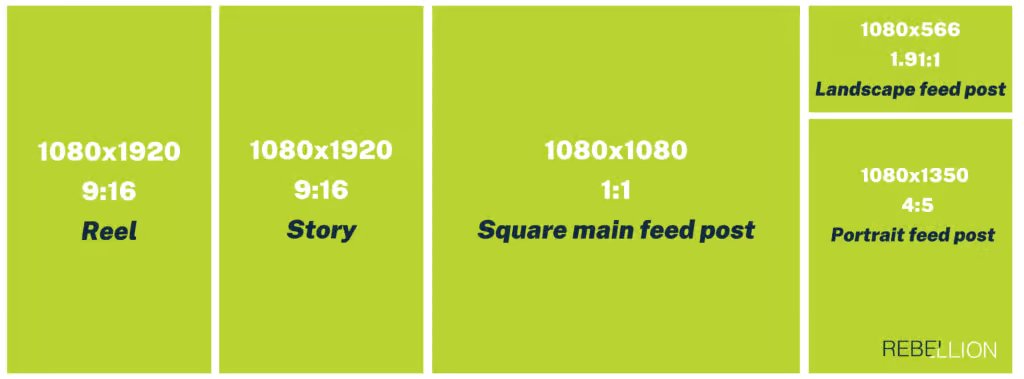
Square posts are 1080 x 1080 pixels. This size works well for most content types.
For vertical posts, use a 4:5 ratio. This translates to 1080 x 1350 pixels. Vertical posts take up more screen space, grabbing attention.
Horizontal posts have a 1.91:1 ratio, or 1080 x 566 pixels. These are great for landscapes or group photos.
Remember, Instagram will crop your image if it doesn’t fit these ratios. To avoid this, stick to the recommended sizes.
The minimum resolution for Instagram posts is 320 x 320 pixels. For best quality, aim for the maximum of 1080 x 1080 pixels.
Optimising Images for Instagram Feeds
Getting your Instagram feed images right is crucial for making a great impression. The right size and format can make your posts pop and catch your followers’ eyes.
Square Posts
Square posts are a classic Instagram format. They’re 1080 x 1080 pixels in size, with a 1:1 aspect ratio. This shape fits perfectly in your profile grid, creating a neat and tidy look.
To make the most of square posts:
• Use high-quality images that look sharp even when cropped • Place your subject in the centre for maximum impact • Try the rule of thirds for a balanced composition
Square photos work well for product shots, portraits, and symmetrical scenes. They’re versatile and always look good in the feed.
Portrait Images
Portrait images give you more vertical space to work with. The ideal size is 1080 x 1350 pixels, with a 4:5 aspect ratio. This format takes up more screen space, making your content more eye-catching as users scroll.
Tips for portrait images:
• Use the extra height for full-body shots or tall products • Create infographics or text-heavy content • Showcase vertical scenes like buildings or trees
Remember, portrait images will be cropped to square in your profile grid. Make sure the important bits aren’t cut off!
Landscape Photos
Landscape photos are great for wide scenes. Use a size of 1080 x 608 pixels with a 1.91:1 aspect ratio. This format is perfect for panoramas, group shots, or showing off expansive views.
To nail your landscape posts:
• Keep key elements away from the edges • Use negative space to draw attention to your subject • Try a cinematic crop for dramatic effect
Landscape photos can break up your feed nicely, adding variety to your profile grid. Just don’t overuse them, as they take up less vertical space in the feed.
Getting the Best Out of Instagram Stories
Instagram Stories offer a dynamic way to engage your audience. Proper sizing and creative video content are key to making your stories stand out.
Story Size and Resolution
To make your Instagram Stories look their best, use the ideal dimensions of 1080 x 1920 pixels. This ensures your content fills the entire Stories screen without awkward cropping or stretching. The aspect ratio should be 9:16, which perfectly fits most mobile screens.
For images, aim for a resolution of 72 DPI. This keeps your photos crisp without exceeding file size limits. When choosing a cover photo for video Stories, select a compelling frame that grabs attention.
Remember, Instagram will automatically resize images that don’t fit these specs. To avoid this, use design tools that offer Instagram Story templates.
Video Content in Stories
Video size for Stories should not exceed 4GB. Keep your clips short and sweet – you have up to 15 seconds per Story segment. For longer content, consider breaking it into multiple segments.
To captivate viewers:
- Use bold text overlays
- Add interactive stickers
- Include music or voiceovers
Experiment with different video styles like time-lapses, boomerangs, or behind-the-scenes footage. This variety keeps your audience engaged and coming back for more.
Mastering Instagram Reels and Videos
Instagram Reels and videos have specific size requirements to look their best. Getting these dimensions right will help your content stand out and engage more viewers.
Instagram Reels Sizing
Instagram Reels are best viewed in a vertical format. You’ll want to create your Reels with a 9:16 aspect ratio. This means your video should be 1080 pixels wide by 1920 pixels tall.
For the best quality, aim for a resolution of 1080×1920 pixels. This ensures your Reels look crisp and clear on all devices.
Keep in mind that Reels can be between 3 seconds and 15 minutes long. But shorter videos often perform better, so try to keep yours under a minute if possible.
File size matters too. Instagram will compress videos larger than 4GB, which can reduce quality. Keep your file size under this limit for the best results.
Ideal Video Dimensions
For regular Instagram videos, you have more flexibility with dimensions. The platform supports square, vertical, and landscape formats.
Square videos (1:1 ratio) work well in the main feed. Use 1080×1080 pixels for optimal quality.
Vertical videos (9:16 ratio) are great for Stories and IGTV. Use 1080×1920 pixels, just like with Reels.
Landscape videos (16:9 ratio) can work in the main feed too. Aim for 1920×1080 pixels.
Remember, Instagram will crop your video if it doesn’t fit these ratios. So it’s best to create your content with these dimensions in mind from the start.
Understanding Instagram Carousel Posts
Instagram carousel posts let you share multiple images or videos in a single post. They’re great for telling stories or showing off products. You can mix photos and videos to make your posts more engaging.
Image and Video Sizes for Carousel
When creating carousel posts, you need to pay attention to the recommended sizes and aspect ratios. The best size for carousel images is 1080 x 1080 pixels with a 1:1 square ratio. This ensures your images look crisp and fit perfectly in the feed.
For videos, aim for 1080 x 1080 pixels as well. Keep in mind that Instagram allows different aspect ratios too. You can use landscape (1.91:1) or portrait (4:5) formats. Just make sure all slides in your carousel have the same aspect ratio for a smooth viewing experience.
Remember, the first image or video in your carousel will be the cover. Choose something eye-catching to grab attention. You can upload up to 10 items in a single carousel, so make each one count!
Optimal Profile Picture Presentation
Your Instagram profile picture is the first thing people see when they visit your page. It’s crucial to get it right.
The ideal size for your profile photo is 320 x 320 pixels. Instagram displays it at 110 x 110 pixels, but uploading a larger image ensures better quality.
Here are some tips for a stellar profile picture:
• Use a clear, high-quality image • Centre your face in the frame • Choose a well-lit photo • Keep it simple – avoid busy backgrounds
Remember, your profile picture appears in a circular crop on Instagram. Make sure important elements aren’t cut off at the edges.
For businesses, consider using your logo. This helps with brand recognition across the platform.
Your profile grid is the collection of your posts visible on your main page. While not directly related to your profile picture, it’s worth noting that a cohesive grid can complement your profile image nicely.
Updating your profile picture regularly can keep your account fresh and engaging. But don’t change it too often – you want people to recognise you easily.
With these tips, you’ll be well on your way to presenting an eye-catching profile picture that represents you or your brand perfectly on Instagram.
Comprehensive Guide to Image Quality and Types
Instagram favours high-quality images that capture attention. Proper sizing and formatting are key to making your posts stand out. Let’s explore the essential guidelines for image quality and types on the platform.
Image Size Guidelines
You’ll want to aim for larger images to ensure crisp, clear visuals. The ideal size for most Instagram posts is 1080 x 1080 pixels. This works well for square images, which are still popular on the platform.
For portrait orientation, use 1080 x 1350 pixels. Landscape images look best at 1080 x 566 pixels. Remember, Instagram’s auto-cropping feature may adjust your image if it doesn’t fit these ratios.
Don’t worry too much about file size. Instagram compresses images anyway, but try to keep them under 30 MB for smoother uploads.
Choosing the Right File Format
When it comes to file formats, JPEG is your best mate for most Instagram posts. It offers a good balance of quality and file size.
For graphics or images with text, PNG files are a better choice. They maintain sharper edges and clearer text, but tend to have larger file sizes.
If your image is too large, use an image compression tool before uploading. This helps maintain quality while reducing file size.
Remember, Instagram converts all uploads to JPEG format, so don’t fret if your original isn’t in this format.
Maximising Visual Impact on Mobiles
Instagram posts must look stunning on mobile screens. The right size and format can make your content pop on smartphones, catching eyes as users scroll.
Smartphone Display Considerations
When creating Instagram posts, you’ve got to think about how they’ll appear on various mobile devices. Different phone models have different screen sizes and resolutions. Your images need to look crisp across the board.
Aim for a minimum of 1080 pixels wide for your posts. This ensures they’ll look sharp on most modern smartphones. Remember, many folks view Instagram on smaller screens, so keep text large and easy to read.
Consider the aspect ratio too. A 4:5 ratio often works well for portrait posts, filling most of the screen without getting cut off. For Stories and Reels, go for 9:16 to use all available space.
Test your posts on different devices before sharing. What looks great on your phone might not shine on others. Play with contrast and colours to make your visuals stand out in busy feeds.
Practical Tips for Content Creation
Creating eye-catching Instagram posts requires attention to detail and the right tools. Let’s explore some essential techniques to elevate your content.
Editing Tools and Techniques
To make your Instagram posts stand out, you’ll need the right editing tools. Start with a reliable photo editing app like Snapseed or VSCO. These apps offer powerful features to adjust brightness, contrast, and colour balance.
Use filters sparingly to maintain a natural look. Experiment with sharpening tools to enhance details without overdoing it. Don’t forget to crop your images to the correct dimensions for each post type.
For text overlays, try apps like Canva or Over. They offer templates that make it easy to create professional-looking graphics. Remember to keep text minimal and easy to read on small screens.
Maintaining Image Consistency
Consistency is key for a cohesive Instagram feed. Choose a colour palette that reflects your brand and stick to it. Use similar tones and filters across your posts to create a unified look.
Pay attention to image quality and resolution. Always upload high-resolution images to ensure crisp, clear posts. Blurry or pixelated photos can turn followers away.
Create a content calendar to plan your posts in advance. This helps you maintain a consistent posting schedule and ensures your feed looks balanced. Mix up your content types – include photos, videos, and carousel posts to keep things interesting.
Strategic Approach to Instagram Posting
Crafting an effective Instagram strategy requires careful planning and alignment with your overall business goals. You’ll need to consider your target audience, content themes, and posting frequency to maximise engagement and growth.
Aligning Posts with Social Media Strategy
Your Instagram posts should seamlessly integrate with your broader social media strategy. Start by defining clear objectives for your business profile. Are you aiming to boost brand awareness, drive sales, or build a community?
Next, research your target audience’s preferences and behaviours on Instagram. What type of content do they engage with most? When are they most active on the platform?
Create a content calendar that reflects your brand’s voice and values. Mix up your post formats, using a combination of photos, videos, and carousel posts to keep your feed visually interesting. Don’t forget to incorporate trending topics and hashtags relevant to your industry.
Consistency is key. Aim to post regularly, but prioritise quality over quantity. Use Instagram’s built-in analytics tools to track your performance and adjust your strategy accordingly.
Remember to cross-promote your Instagram content on other platforms like your Facebook Page to maximise reach and engagement. This integrated approach will help you build a cohesive online presence and drive your business growth.
Frequently Asked Questions
Instagram post sizes can be tricky to navigate. Let’s address some common queries to help you optimise your images for the platform.
What are the specific dimension requirements for Instagram posts?
Instagram supports various post sizes. Square posts should be 1080 x 1080 pixels with a 1:1 aspect ratio. For landscape posts, aim for 1080 x 566 pixels with a 1.91:1 ratio. Portrait posts work best at 1080 x 1350 pixels with a 4:5 ratio.
How can I ensure my Instagram images are displayed at maximum quality?
To maintain image quality, keep your file size under 30 MB. Use JPEG or PNG formats for the best results. Avoid compressing your images too much, as this can lead to pixelation.
What ratio should I use for my Instagram images to avoid cropping?
For feed posts, stick to aspect ratios between 1.91:1 and 4:5. Square posts (1:1) are always safe. For Stories, use a 9:16 ratio to fill the entire screen without cropping.
Can you detail the ideal pixel size for Instagram posts?
The ideal pixel size for Instagram posts is 1080 pixels wide. The height can vary based on your chosen aspect ratio, but 1080 x 1080 pixels for square posts is a good starting point.
What are the dimensions for Instagram Stories compared to regular posts?
Instagram Stories have different dimensions than regular posts. Use 1080 x 1920 pixels for Stories, which gives you a 9:16 aspect ratio. This format fills the entire mobile screen.
How do I convert photo sizes to be optimised for Instagram uploading?
You can use photo editing tools like Canva or Adobe Photoshop to resize your images. Many mobile apps also offer quick resizing options. Always maintain the aspect ratio to avoid distortion when resizing.
Latest news
13 min read
30th Sep 2026
Beyond the Prospectus: Storytelling That Attracts the Right Families
Choosing a school is rarely about one thing. Facilities certainly matter, and parents will want to know about classrooms, sports pitches, theatres, boarding houses and laboratories. An impressive campus can help create confidence, but buildings alone rarely explain why one school feels right and another does not. Families are trying...
Rebellion Marketing
Read article

13 min read
21st Sep 2026
AI Search Optimisation: A Practical Guide (Minus the Mystical Nonsense)
AI search has moved the front door to your website, and nobody sent a change of address card! Someone asks ChatGPT which consultancy to shortlist, or types a question into Google and gets an AI-generated answer with three cited sources. Your brand is either in that answer or it isn’t....

Jade Arnell
Read article
13 min read
17th Sep 2026
Thought Leadership Without the Waffle: A No-Nonsense Guide for Firms
Few marketing phrases manage to sound as important and say as little as “thought leadership”. Professional services firms are routinely told they need more of it. Partners should become thought leaders. The website needs thought leadership content. LinkedIn needs a thought leadership strategy. Before long, somebody is suggesting a quarterly...
Rebellion Marketing
Read article

13 min read
9th Sep 2026
How AI Decides Which Schools to Recommend to Parents
A parent looking for a school used to begin with a fairly predictable Google search. They might type “independent schools near Oxford”, open several websites and gradually build a shortlist. Increasingly, there is another option. They can ask an AI system a much more specific question. “Which independent girls’ schools...
Rebellion Marketing
Read article